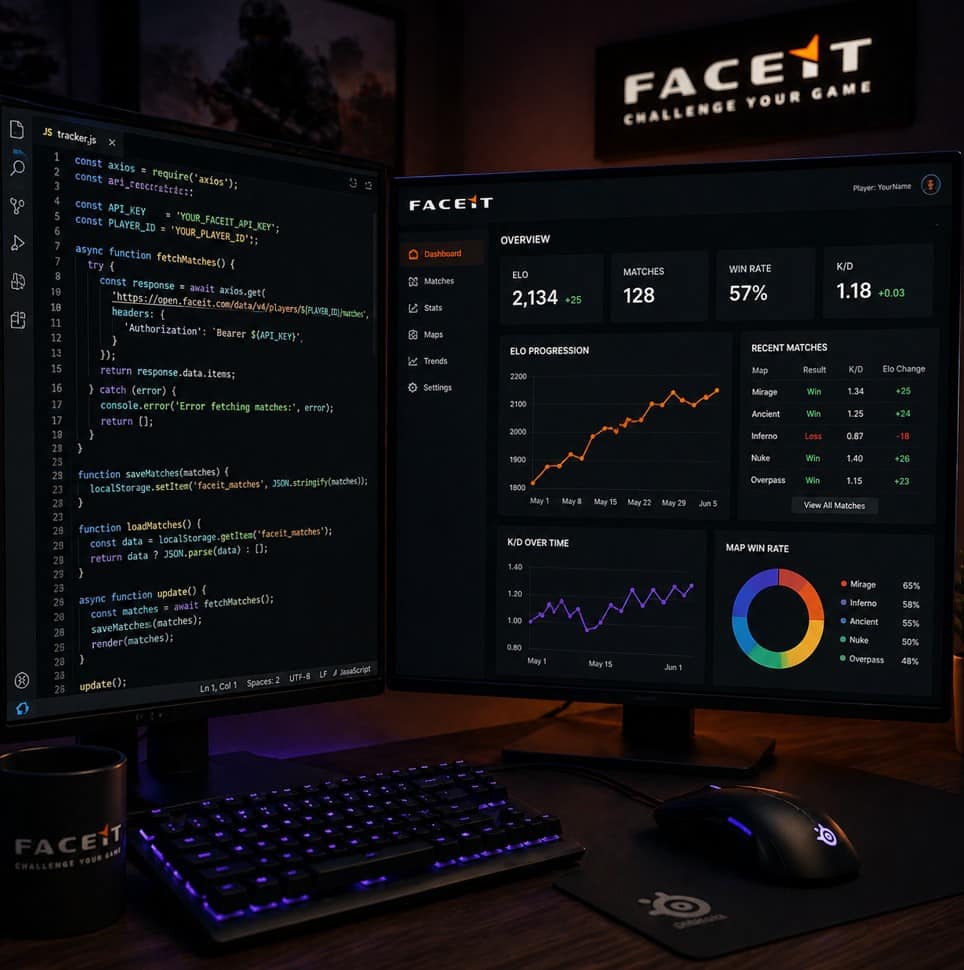
If you’re serious about climbing FACEIT levels in CS2, tracking your performance is essential, even if you’ve considered options like a CSGO faceit boost. The problem is that most players rely on memory or manually check stats after matches, which is inconsistent and time-consuming. Over time, you lose visibility into your progress, patterns, and areas that need improvement.
This is where automation comes in. By
using JavaScript, you can build a simple system that automatically tracks your FACEIT matches, logs key stats, and helps you analyze your performance over time. You don’t need to be an advanced developer to get started. Even a basic setup can give you a huge advantage.
Why Automate Your FACEIT Tracking
Manual tracking has limits. You might check your Elo after a match or glance at your KDA, but neither tells the full story. It also doesn’t give you a long-term view of your performance.
Automation helps you:
- Track every match consistently.
- Store historical data for analysis.
- Identify trends across games.
- Save time and reduce effort.
Instead of guessing why you’re stuck in low Elo, you’ll have actual data to guide your improvement.
What You Can Track
Before building anything, it’s important to define what you want to track. FACEIT provides a variety of stats that you can use to understand your gameplay.
At a basic level, you can track:
- Match result (win or loss)
- Elo change
- Kills, deaths, assists.
- KDA ratio
- Map played
- Date and time
As you get more advanced, you can include:
- Headshot percentage
- Opening duel success
- Average damage per round
- Match duration
Start simple, then expand as needed.
How JavaScript Fits In
JavaScript is ideal for this because it can:
- Fetch data from APIs
- Process and store information
- Display results in a browser
This eliminates the need to manually input anything. The key concept here is using APIs. FACEIT offers an API that allows developers to access player stats and match history. With JavaScript, you can send requests to this API and retrieve your data in real time.
Step 1: Get Access to the FACEIT API
To automate tracking, you’ll need access to FACEIT’s developer API. Once you have an API key, you can start making requests.
You’ll typically need:
- Your FACEIT player ID
- An API key for authentication
Step 2: Fetch Your Match Data
This allows your app to automatically pull your latest matches. This returns your match history in JSON format. From here, you can extract the stats you care about.
Step 3: Store the Data
Once you have your data, you need a way to store it. For a simple setup, you can use:
- Local storage in the browser
- A JSON file
- A lightweight database like Firebase
Local storage is the easiest option if you’re just starting. It allows you to save match data directly in your browser without any backend setup.
Step 4: Display Your Stats
Now that you have your data, the next step is to make it readable. Using HTML and JavaScript, you can create a simple dashboard.
You can display:
- Your latest matches in a table
- Win and loss streaks.
- Elo progression over time
For better visualization, you can use libraries like Chart.js to create graphs. This helps you see trends instead of just numbers.
Step 5: Automate Updates
To fully automate your tracking, you can set your app to fetch new data at regular intervals.
For example, you can:
- Refresh data every time you open the page.
- Use a button to manually sync
- Set timed updates using JavaScript.
This ensures your stats are always up to date without any manual effort.
Turning Data Into Insights
Tracking data is only useful if you actually use it to improve. Once your system is in place, start looking for patterns.
For example:
- Are you losing more on certain maps?
- Do your stats drop during long sessions?
- Are you performing better at certain times of day?
These insights help you adjust your playstyle and habits.
Benefits for FACEIT Climbing
Automated tracking gives you consistency. Instead of relying on memory, you have a complete record of your matches.
This leads to:
- Better awareness of your strengths and weaknesses
- More focused practice sessions
- Smarter decision-making in-game
Over time, these small advantages add up and help you climb more consistently.
Common Mistakes to Avoid
While building your tracker, keep things simple. Many players try to build complex systems too early and end up abandoning them.
Avoid:
- Tracking too many stats at once
- Overcomplicating your interface
- Ignoring the data after collecting it
Start with a basic version, then gradually improve it.
Final Thoughts
Automating your FACEIT match tracking with JavaScript is one of the smartest ways to take control of your improvement. It removes guesswork, saves time, and gives you a clear view of your performance.
You don’t need a complex system to get started. Even a simple tracker can provide valuable insights that help you break out of low Elo.
In the end, climbing FACEIT is about consistency and awareness. By building your own tracking system, you’re not just playing more games. You’re learning from every match and improving with purpose.